
TymeBank Login: Securely Access Your Account 2026 Guide
Managing your money should be simple, secure, and available whenever you need it. That's exactly what TymeBank Login offers. As one of South Africa's leading digital banks, TymeBank enables customers to check balances, transfer money, pay bills, manage savings, and monitor transactions directly from their smartphones.

Fact check
At RandHub, we value the role of fact-checking. Our experts and editors have meticulously verified the information you see on our platform for authenticity. While we strive to provide the most current information, it's essential to understand that facts can evolve. We encourage you to independently verify critical details and seek advice from financial experts when needed. If you ever have concerns about our content accuracy or wish to make amendments, please don't hesitate to contact us. learn more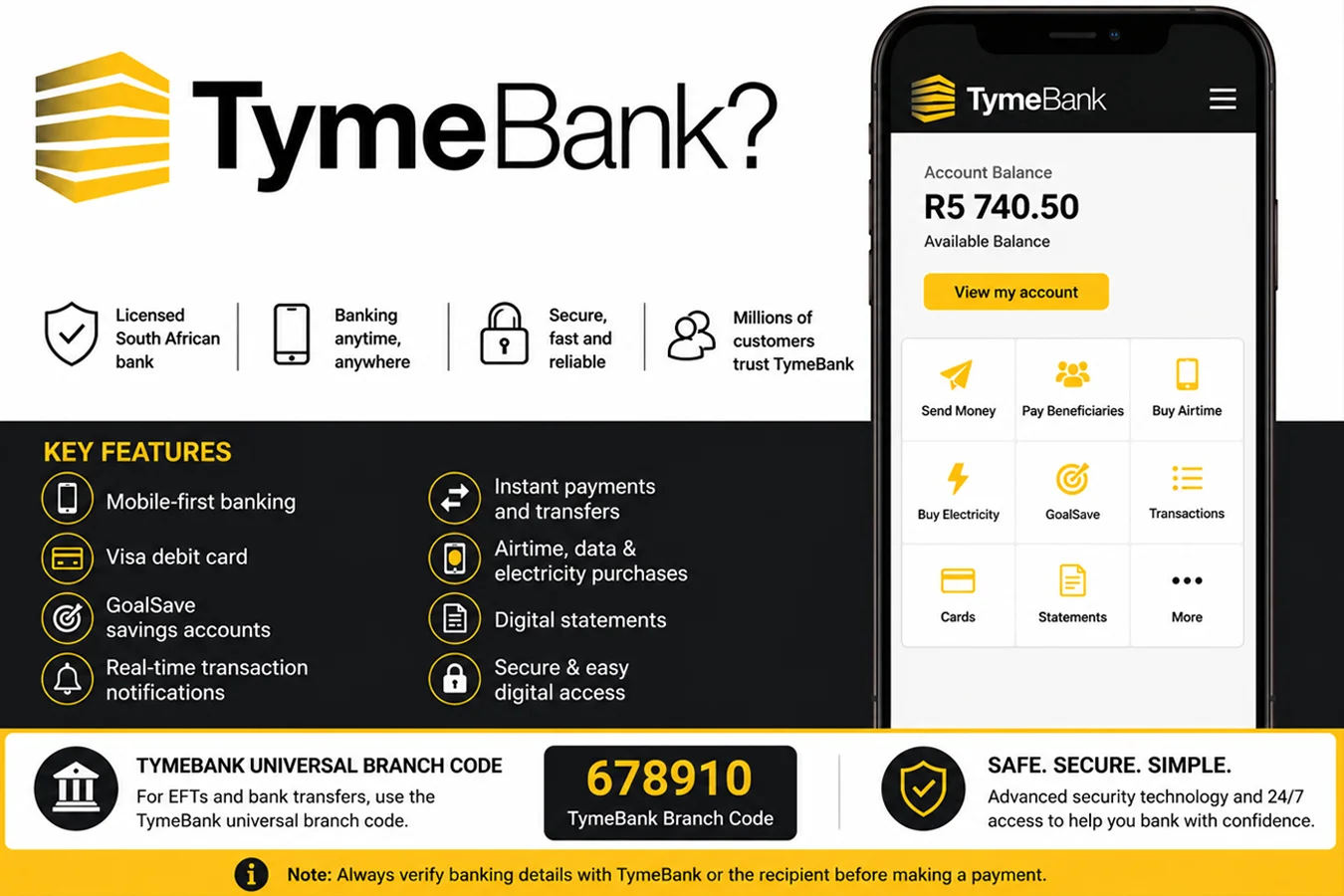
Unlike traditional banks that rely heavily on physical branches, TymeBank focuses on digital banking, allowing customers to complete most everyday banking tasks through its mobile app. Whether you’re checking your account before making a purchase or reviewing your latest salary deposit, logging in gives you quick access to your banking information.
Our guide explains everything you need to know about the TymeBank login process, including how to sign in securely, what to do if you forget your password, common login issues, and practical security tips to help protect your account.
What is TymeBank?
TymeBank is a South African digital bank that offers affordable, everyday banking services. For electronic funds transfers (EFTs), TymeBank uses the universal branch code 678910, which is accepted for most local bank transfers in South Africa.
The bank offers a range of personal banking services, such as transaction accounts, GoalSave savings accounts, Visa debit cards, digital payments, and real-time account management.
What Is TymeBank Login?
TymeBank Login is the secure authentication process that allows registered customers to access their banking accounts using approved credentials.
After successfully signing in, you can access a range of banking services without visiting a branch, including:
- Check your available account balance
- Review recent transactions
- Transfer money between accounts
- Send money to other people
- Buy prepaid airtime and data
- Purchase prepaid electricity
- Manage your debit card
- View or download account statements
- Monitor your GoalSave savings accounts
- Receive account notifications
TymeBank uses multiple security measures, including device verification and one-time passwords (OTPs), to help protect customer accounts from unauthorised access.
Why Use TymeBank Online Banking?
Digital banking saves time and gives you greater control over your finances. Instead of waiting in queues or visiting a branch, you can complete most banking tasks in just a few taps.
Some of the key benefits include:
Banking Anytime
Access your account 24 hours a day from almost anywhere with an internet connection.
Real-Time Account Monitoring
Track deposits, withdrawals, and purchases as they happen.
Convenient Payments
Transfer funds, pay beneficiaries, and purchase prepaid services without leaving home.
Improved Financial Management
Regularly checking your account helps you monitor spending, identify unusual activity, and stay on top of your budget.
Enhanced Security
Digital banking includes modern security features such as encrypted connections, secure authentication, and transaction alerts.
What are Requirements Before You Log in Online?
Before attempting to access your TymeBank account, make sure you have everything you need.
- An Active TymeBank Account
You must have successfully opened and activated a TymeBank account before using online banking services.
- Registered Mobile Number
Your registered cellphone number plays an important role during login and identity verification. It is also used to receive one-time passwords (OTPs) when additional verification is required.
If you recently changed your mobile number, update your banking details through the official TymeBank support channels.
- TymeBank Mobile App
Most customers access their accounts using the official TymeBank mobile application.
Always download the app from trusted app stores to reduce the risk of installing fraudulent software.
- Stable Internet Connection
An unstable internet connection may interrupt the login process or prevent account information from loading correctly.
Switching between Wi-Fi and mobile data may resolve temporary connectivity issues.
- Updated Mobile Application
Running the latest version of the TymeBank app helps ensure:
- Better security
- Bug fixes
- Improved performance
- Access to the newest banking features
Enable automatic updates whenever possible.
How to Log In to Your TymeBank Account?
Signing in is designed to be quick while maintaining strong security standards.
Follow these steps.
Step 1: Open the TymeBank App
Locate the official TymeBank application on your smartphone and tap to launch it.
Before entering any information, confirm that you are using the official application.
Step 2: Enter Your Login Credentials
Depending on your account settings, you’ll be asked to provide your authentication details.
These may include:
- Registered cellphone number
- PIN
- Password
- Biometric authentication (fingerprint or facial recognition)
Always enter your information carefully to avoid repeated failed login attempts.
Step 3: Complete Identity Verification
For additional security, TymeBank may request another verification step.
Examples include:
- One-Time Password (OTP)
- Fingerprint verification
- Face recognition
- Device confirmation
These checks help prevent unauthorised access.
Step 4: Access Your Dashboard
Once authentication is successful, you’ll be taken to your banking dashboard.
From here, you can:
- View account balances
- Review transaction history
- Send money
- Buy airtime
- Purchase electricity
- Manage savings
- Access account settings
Most services are available immediately after login.
What Can You Do After Logging In?
TymeBank’s digital banking platform allows customers to manage many everyday banking tasks in one place.
Check Your Balance
Your available account balance appears on the dashboard, allowing you to see how much money is available before making purchases or transfers.
View Transaction History
Review recent deposits, withdrawals, card purchases, and transfers.
Regularly checking your transaction history helps you quickly identify any unfamiliar activity.
Transfer Money
You can transfer funds between eligible accounts or make payments where supported.
Digital transfers are generally faster and more convenient than visiting a physical banking location.
Buy Airtime and Data
Many customers use the app to purchase prepaid mobile services directly from their bank account.
This removes the need to visit a separate retailer.
Purchase Prepaid Electricity
If prepaid electricity purchases are available for your account, you can buy electricity tokens through the app in just a few minutes.
Manage Your GoalSave Accounts
TymeBank’s GoalSave feature allows customers to build savings towards specific financial goals.
After logging in, you can:
- View savings balances
- Track progress
- Transfer money into savings
- Monitor multiple savings goals
Download Bank Statements
Account statements are useful when:
- Applying for loans
- Applying for visas
- Preparing tax records
- Monitoring monthly spending
- Verifying income
Digital statements can usually be viewed or downloaded directly within the banking platform.
Manage Your Debit Card
Customers can manage various card-related settings after logging in, depending on available features.
Examples include:
- Viewing card information
- Monitoring card activity
- Managing card security settings
- Reporting a lost or stolen card through official support channels
Receive Banking Notifications
Notifications help keep you informed about important account activity, such as:
- Salary deposits
- Purchases
- Transfers
- Security alerts
- Successful payments
Enabling notifications allows you to respond quickly if you notice unexpected transactions.
How to Register for TymeBank Online Banking?
If you’ve recently opened a TymeBank account, you’ll need to complete the initial setup before you can access digital banking services. Registration helps link your account to your mobile device while confirming your identity.
Although the exact registration screens may change as the app is updated, the general process remains straightforward.
Step 1: Download the Official TymeBank App
Install the TymeBank app from the official app store on your Android or iPhone device. Verify that the publisher is TymeBank before downloading.
Step 2: Enter Your Personal Details
Open the app and provide the requested information, such as your registered mobile number or South African ID number, depending on the registration requirements.
Step 3: Verify Your Identity
TymeBank may send a One-Time Password (OTP) to your registered cellphone number. Enter the code within the required time to verify your identity.
Step 4: Create Your Login Credentials
Choose a secure PIN or password if prompted. Avoid using predictable combinations such as birthdays or repeated numbers.
Step 5: Enable Biometric Login
If your device supports fingerprint or facial recognition, consider enabling biometric authentication. It provides a faster and more secure login experience without replacing your password entirely.
Tip: Keep your registered mobile number up to date. It plays a vital role in account recovery and security verification.
What should you do if you forgot your TymeBank password?
Forgetting your password or PIN doesn’t necessarily mean you’ve lost access to your account. TymeBank provides a secure recovery process to help you regain access while protecting your personal information.
How to Reset Your Password?
Follow these general steps:
- Open the TymeBank app.
- Tap Forgot Password or the available account recovery option.
- Enter your registered mobile number or other requested details.
- Verify your identity using the OTP sent to your phone.
- Create a new secure password or PIN.
- Log in using your updated credentials.
Once your password has been reset successfully, your old password will no longer work.
Tips for Creating a Strong Password
Choose a password that is:
- At least 12 characters long, where supported.
- A mix of uppercase and lowercase letters.
- Includes numbers and symbols.
- Different from passwords used on other websites.
- Not based on personal information such as your birthday or ID number.
Using a password manager can also help you create and store strong, unique passwords securely.
TymeBank Login Not Working? Common Problems and Solutions
Occasionally, you may experience difficulty signing in. In many cases, the issue can be resolved without contacting customer support.
Incorrect Password or PIN
Entering the wrong password several times may temporarily prevent you from logging in.
Solution:
- Double-check your password.
- Ensure Caps Lock is not enabled if applicable.
- Use the password recovery option if you cannot remember your credentials.
OTP Not Received
A delayed or missing OTP is one of the most common login issues.
Possible causes include:
- Poor mobile network coverage.
- Incorrect registered phone number.
- SMS delivery delays.
- Airplane mode enabled.
Solution:
- Wait a few minutes before requesting another OTP.
- Confirm your phone has network coverage.
- Restart your device if necessary.
- Ensure your registered number is still active.
Poor Internet Connection
A weak internet connection can interrupt authentication or prevent account information from loading.
Solution:
- Switch between Wi-Fi and mobile data.
- Restart your router if using Wi-Fi.
- Move to an area with better mobile signal.
Outdated Mobile App
Older versions of the app may no longer support certain security features.
Solution:
Update the TymeBank app through your device’s official app store before attempting to log in again.
Temporary System Maintenance
Banks occasionally perform scheduled maintenance to improve security and system performance.
During these periods, login services may be temporarily unavailable.
Solution:
Wait for the maintenance window to finish and try again later.
Account Locked
For security reasons, repeated unsuccessful login attempts may temporarily lock your account.
Solution:
Use the account recovery process or contact TymeBank customer support if the lock remains after the recommended waiting period.
Device Verification Issues
Logging in from a new smartphone or recently reset device may trigger additional security checks.
Solution:
Complete all requested verification steps and avoid skipping any authentication prompts.
What are the security tips for logging into TimeBank?
Protecting your banking information is just as important as accessing it conveniently. Following good security habits can significantly reduce the risk of fraud or unauthorised account access.
Never Share Your OTP
A One-Time Password is intended only for you. TymeBank employees or legitimate support staff should never ask for your OTP.
If someone requests it by phone, email, SMS, or social media, treat it as a potential scam.
Enable Biometric Authentication
Fingerprint or facial recognition provides an additional layer of protection while making future logins faster.
If your smartphone supports biometrics, enable the feature within your banking settings.
Keep Your App Updated
Software updates often include:
- Security improvements.
- Bug fixes.
- Performance enhancements.
- Protection against newly discovered vulnerabilities.
Enable automatic updates whenever possible.
Avoid Public Wi-Fi
Public wireless networks may expose sensitive information if they are not properly secured.
When accessing your bank account:
- Use your mobile data where possible.
- Connect only to trusted Wi-Fi networks.
- Consider using a reputable VPN when necessary.
Monitor Your Transactions Regularly
Checking your account frequently helps you identify suspicious activity early.
If you notice an unfamiliar payment or transfer, report it to TymeBank immediately.
Protect Your Smartphone
Your phone is effectively your digital wallet.
Secure it by:
- Setting a screen lock.
- Enabling automatic locking.
- Keeping the operating system updated.
- Installing apps only from trusted sources.
Beware of Phishing Attempts
Fraudsters often send fake messages pretending to be from banks.
Common warning signs include:
- Urgent requests to “verify” your account.
- Links to unfamiliar websites.
- Requests for passwords, PINs, or OTPs.
- Poor spelling or unusual email addresses.
Always access your account by opening the official TymeBank app yourself rather than clicking links in unsolicited messages.
Log Out on Shared Devices
If you ever access your banking account on a shared or temporary device, log out completely once you’ve finished.
Avoid saving passwords on devices you do not own.
How to Download the TymeBank App Safely?
Downloading the correct application is essential for protecting your banking information.
For Android Users
- Open the Google Play Store.
- Search for TymeBank.
- Verify the publisher before downloading.
- Install the app.
- Open it and complete the login process.
For iPhone Users
- Open the Apple App Store.
- Search for TymeBank.
- Confirm the app is published by the official developer.
- Install the application.
- Log in using your registered account details.
Security Reminder: Never download banking apps from third-party websites or unofficial app stores, as they may contain malicious software.
Can You Access TymeBank Without the App?
TymeBank is a mobile-first digital bank, which means most everyday banking services are designed to be accessed through its official mobile application. While some banking providers offer full internet banking through a desktop browser, TymeBank’s primary customer experience is centred around the mobile app.
For the latest information, always refer to TymeBank’s official website or customer support.
How is TymeBank’s customer support?
If you’re unable to access your account after following the troubleshooting steps, contact TymeBank through its official support channels.
Customer support can assist with:
- Account access issues
- Password or PIN recovery
- Updating your registered mobile number
- Reporting a lost or stolen debit card
- Reporting suspicious transactions
- General account enquiries
Before contacting support, have the following information ready:
- Your full name
- South African ID or passport details (if requested)
- Your registered mobile number
- A brief description of the issue
- Any error message displayed during login
Providing accurate information can help resolve your issue more quickly. Never share sensitive information like your password, PIN, or one-time password (OTP) with anyone who claims to be a bank representative.
What are some common TymeBank login error messages you might encounter?
Occasionally, you may see an error message while trying to sign in. Understanding what these messages mean can help you resolve the issue without unnecessary delays.
Invalid Credentials
This message usually means the entered password, PIN, or registered mobile number doesn’t match your account records.
How to fix it:
- Check your login details carefully.
- Try again using the correct credentials.
- Reset your password if necessary.
Session Expired
For security reasons, inactive login sessions automatically end after a period of inactivity.
How to fix it:
- Return to the login screen.
- Sign in again.
- Complete your banking tasks without leaving the app idle for long periods.
Too Many Login Attempts
Entering incorrect login details several times may temporarily lock your account.
How to fix it:
- Wait for the temporary lock period to end.
- Reset your password if you’ve forgotten it.
- Contact TymeBank support if the issue continues.
Authentication Failed
Authentication may fail if identity verification cannot be completed.
Common reasons include:
- Incorrect OTP
- Expired verification code
- Interrupted internet connection
How to fix it:
- Request a new OTP.
- Ensure your internet connection is stable.
- Complete the verification promptly before the code expires.
Server Unavailable
Sometimes the banking system may be temporarily unavailable due to scheduled maintenance or unexpected technical issues.
How to fix it:
- Wait a few minutes.
- Try again later.
- Check TymeBank’s official communication channels for service updates if the problem persists.
Verification Timeout
This message appears when the verification process isn’t completed within the allowed time.
How to fix it:
- Restart the login process.
- Request a fresh verification code.
- Complete the authentication without unnecessary delays.
Frequently Asked Questions (FAQs)
How do I log in to my TymeBank account?
Open the official TymeBank app, enter your registered login credentials, complete any required identity verification, and you’ll be directed to your account dashboard.
Can I access TymeBank without the mobile app?
TymeBank primarily provides banking services through its mobile application. Always check the official TymeBank website for the latest information about available online banking options.
What should I do if I forget my TymeBank password?
Use the Forgot Password option within the app, verify your identity using the OTP sent to your registered mobile number, and create a new secure password or PIN.
Why is my TymeBank login not working?
Common causes include incorrect login credentials, poor internet connectivity, delayed OTPs, an outdated app, temporary maintenance, or a temporarily locked account.
Is TymeBank login secure?
Yes. TymeBank uses security measures such as encrypted communication, identity verification, device authentication, and OTPs to help protect customer accounts
Can I log in on more than one device?
No, you cannot be logged into your TymeBank account on multiple mobile devices at the same time. This helps protect your account from unauthorised access.
How do I change my registered mobile number?
Contact TymeBank through its official customer support channels. For security reasons, you may need to verify your identity before your contact details can be updated.
Can I download my bank statements after logging in?
Yes. Customers can generally view and download account statements through the TymeBank app.
What should I do if I don’t receive an OTP?
Check that your phone has network coverage, confirm you’re using your registered mobile number, wait a few minutes, and request a new OTP if necessary.
How can I keep my TymeBank account secure?
Use a strong password or PIN, enable biometric authentication, avoid sharing your OTP, keep the app updated, monitor your account regularly, and only log in through the official TymeBank app.
Disclaimer:
RandHub is an independent informational website and is not affiliated with, endorsed by, or associated with TymeBank Limited. The information in this guide is published for general educational purposes only and should not be considered financial, legal, or banking advice.
Always verify the latest information through TymeBank’s official website or customer support before making financial decisions.