
GEPF Online Self-Service Login: Register – Withdrawal & Balance Check
To manage your pension benefits, you no longer need to stand in long queues at a provincial office or wait weeks for paperwork to be processed. The Government Employees Pension Fund (GEPF) Online Self-Service Portal is an official digital system designed to empower South African government employees and pensioners by giving them direct control over their pension information, tax certificates, and claim-tracking capabilities, all in their hands.

Fact check
At RandHub, we value the role of fact-checking. Our experts and editors have meticulously verified the information you see on our platform for authenticity. While we strive to provide the most current information, it's essential to understand that facts can evolve. We encourage you to independently verify critical details and seek advice from financial experts when needed. If you ever have concerns about our content accuracy or wish to make amendments, please don't hesitate to contact us. learn more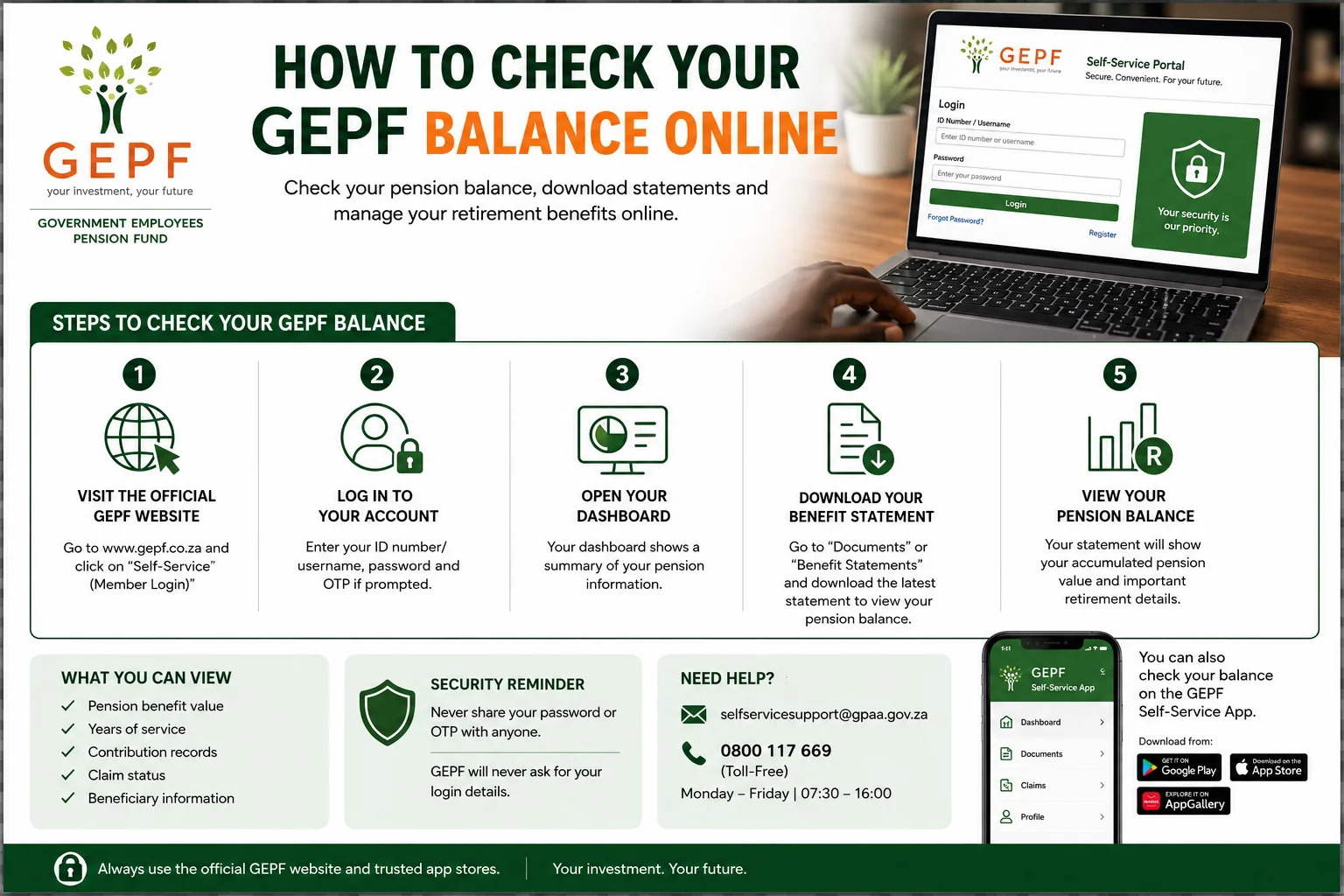
This guide draws upon official GEPF documentation and publicly available GPAA Standard Operating Procedures to help members navigate the platform and manage their accounts securely and effortlessly.
What is GEPF Self-Service?
The online GEPF Self-Service platform was launched in 2019 to modernise South African pension administration and improve transparency for public servants.
The Government Employees Pension Fund (GEPF) Online Self-Service platform is an official digital service managed by the Government Pensions Administration Agency (GPAA). It enables South African government employees, pensioners, and beneficiaries to access pension-related information online securely.
Key Features:
- Document Access: Beneficiaries can instantly download their latest benefit statements and old tax certificates (IRP5, IT3a, and IT3b).
- Claims Tracking: Pensioners and employees can track the real-time status of their resignation, retirement, or withdrawal applications.
- Profile Management: A member can update his/her contact information (phone number and email) so that he/she never misses any important information or messages.
- Beneficiary Management: Members can view and update their nominated beneficiaries to ensure their pension affairs remain tailored to their personal circumstances.
- Personalised Communications: Beneficiaries can receive letters, newsletters and official notifications related to their benefits.
Who Can Use GEPF Self-Service?
The platform is designed for:
- Current government employees contributing to GEPF
- Pensioners receiving benefits
- Beneficiaries linked to GEPF claims
- Former public servants with pension interests
If your employment falls under the South African public sector pension structure, there is a strong possibility your records are already connected to the GEPF system.
How to Register for GEPF Online Self-Service?
Registration is fairly simple, but your existing contact information must be pre-verified in the GEPF database to use the Online Self-Service portal.
What you will need before registering for GEPF Online Self-Service:
- Proof of Identity: You must possess a South African ID number or a valid foreign passport number.
- Registered Mobile Number: A verified mobile number and email address that you have previously registered with GEPF or GPAA as your contact details.
- Web/App Access: Use the official GEPF website or download the “GEPF Self Service” app from the official Apple App Store, Google Play Store, or Huawei AppGallery.
Step-by-Step Process for Online GEPF Self-Service Registration
Step 1: Visit the Official Platform
Go to the official GEPF website and access the Self-Service section.
Before entering your personal details, always ensure that the web address is correct.
Step 2: Select “Register”
Select the registration option on the portal’s homepage.
You will be asked to provide the following information:
- ID or Passport Number
- Personal Details
- Contact Information
Ensure that all details match your official government records.
Step 3: Complete Identity Verification
Some users may receive an authentication questionnaire to verify their identity.
These questions may relate to:
- Employment History
- Personal Details
- Pension-related Records
This step helps protect members against unauthorised access.
Step 4: Receive Temporary Login Credentials
Upon successful verification, the system sends temporary credentials via SMS or email.
These credentials are time-sensitive and should be used immediately.
Step 5: Create a Strong Password
The system requires a secure password that typically includes the following elements:
- At least 8 characters
- At least one uppercase letter
- One number
- One special character
Example Format:
- Pension@2026
Avoid using birthdays, ID numbers, or simple combinations*.
How to Log In to the GEPF Member Portal?
Once registration is complete:
- Visit the official portal
- Enter your username or ID number
- Input your password
- Complete any verification steps if prompted
Members can then access their dashboard and pension records.
How to Download GEPF Tax Certificates?
During tax season, many pensioners search for their IRP5 or IT3(a) certificates online.
To retrieve documents:
- Log in to the portal
- Navigate to “Documents” or “Tax Certificates”
- Select the applicable tax year
- Download the file securely
Many files are password-protected for additional security. In most cases, the password is linked to the member’s South African ID number.
Why Are Some GEPF Documents Password Protected?
Password protection helps prevent fraud and identity theft.
Because pension records contain sensitive financial information, GEPF encrypts many downloadable files before release.
This extra layer of security protects members if documents are accidentally shared or intercepted.
What are Common GEPF Self-Service Problems and Solutions?
Even reliable systems occasionally experience technical difficulties.
Here are some common issues users face.
1. I Cannot Log in to My Account
Possible reasons include:
- Incorrect password
- Expired temporary credentials
- Outdated contact information
- System maintenance
Try resetting your password before contacting support.
2. My Documents Are Missing
Sometimes records do not appear immediately due to:
- Delayed system synchronization
- Incomplete employment records
- Claim processing still underway
If the issue continues, contact GPAA support.
3. I Did Not Receive the OTP or Verification Message
This often happens when:
- Your cellphone number changed
- Network delays occur
- Email spam filters block messages
Ensure your contact details are updated on the system.
Important Security Advice for GEPF Members and Beneficiaries
Cybercrimes targeting pension and financial accounts are on the rise in South Africa. GEPF members and beneficiaries must carefully safeguard their information.
Never Share Your Password
GEPF or GPAA officials will never ask you for your password via email, phone call, or SMS. Do not disclose your login credentials to anyone.
Avoid public Wi-Fi networks.
Public internet connections at malls, cafes, or airports can leak your sensitive pension information. Whenever possible, use a secure private internet connection.
Do Not Save Passwords on Shared Devices
Avoid saving your password on any public computer or device. Always log out after completing your session.
Use Only Official Platforms
Access GEPF services exclusively through official websites and verified app stores. Fraudulent websites may mimic the pension portal to steal your personal information.
Benefits of Using the GEPF Online Self-Service Portal
The GEPF digital system offers numerous advantages compared to traditional manual processes.
· Faster Access to Information
Members can instantly access documents without waiting for physical delivery.
· Enhanced Transparency
Users can track the progress of claims and independently verify their records.
· Reduced Commuting Costs
Members who reside far from walk-in centers can perform many tasks online.
· Improved Record Management
Digital access helps pensioners securely store essential financial documents.
When You Should Contact GPAA Support
Some matters still require direct assistance.
Contact support if:
- Your records are incorrect
- You changed cellphone numbers
- Beneficiary details need correction
- Claims remain delayed for long periods
- Login recovery fails repeatedly
Official Support Channels
Technical Support Email
GPAA Call Centre
0800 117 669
Use only official communication channels to avoid scams.
Tips for First-Time Users
If this is your first time using the system:
- Register during non-peak hours for faster loading
- Keep your ID number nearby
- Use a personal email address
- Save downloaded certificates securely
- Update contact information regularly
Digital pension access becomes much easier after the initial setup.
Why Digital Pension Services Matter in South Africa?
The move toward digital pension administration reflects broader changes across South African public services.
Online access improves efficiency while reducing paperwork and administrative delays. For pensioners in rural or remote areas, digital access also removes significant travel barriers.
As more services become online-based, understanding secure digital practices becomes equally important for every GEPF member.
FAQs – GEPF Online Self-Service Login
How Do I Check My GEPF Balance Online?
Checking your GEPF balance online is the easiest way to keep track of your pension growth and retirement benefits without visiting a GPAA office.
Members can view their pension information through GEPF’s official online self-service portal.
Steps to Check Your GEPF Balance
Step 1: Visit the Official GEPF Self-Service Portal
Go to the official GEPF website and open the self-service login page.
Step 2: Log In to Your Account
Enter the following details:
- South African ID Number or Username
- Password
- OTP Verification Code (if requested)
If you are a first-time user, you must complete the registration process before accessing your account.
Step 3: Open Your Member Dashboard
After logging in, your dashboard will display key pension-related information, including:
- Pension Benefit Value
- Years of Pensionable Service
- Contribution Records
- Claim Status Updates
- Beneficiary Information
Step 4: Download Your Benefit Statement
To view full details regarding your pension balance:
- Navigate to “Documents” or “Benefit Statements”
- Select the most recent available statement.
- Securely download the PDF.
This statement typically displays your accumulated pension value and retirement-related details.
Can I Check My GEPF Balance on Mobile?
Yes. Members can also access these services through the official GEPF self-service mobile app, available on trusted app stores.
This app provides easy access to:
- Pension Records
- Tax Certificates
- Claim Tracking
- Benefit Statements
Why Is My Balance Not Showing?
Sometimes, pension information may not display correctly due to the following reasons:
- Delays in information submission by the employer
- System maintenance
- Incomplete employment records
- Recent updates to member information
Disclaimer
The information is provided by RandHub is intended for educational purposes only and may change as GEPF systems or policies are updated. Always verify details through official GEPF and GPAA communication channels before taking financial or administrative action.